
I am sorry if this is too obvious for some of you, but it seems not obvious to most of my customers. Every few days I get the following question from my customers, which I will try to briefly answer in this post.
Where can I find vmware vCenter converter in VMware vCenter 4?
Unfortunately, unlike most other VMware feature the VMware vCenter Converter does not have any obvious shortcut in vCenter. To start vCenter converter in Virtual Center you will need to follow the below steps:
- Make sure you are in host & clusters view.
- Choose one of your hosts or clusters in vCenter
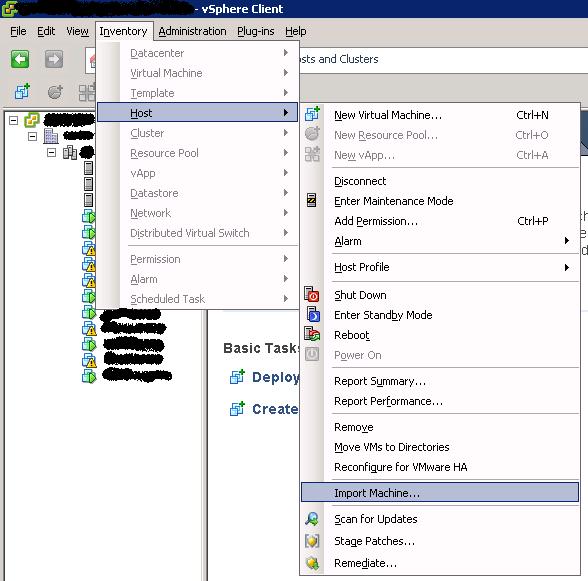
- From the top drop down menu choose one of the following paths depend on if you have chosen a host or cluster in step 2.
Inventory ==> Host ==> Import Machine
Inventory ==> Cluster ==> Import Machine
The image below demonstrate the above steps:
I hope this help few VMware admins out there, & sorry if it was too easy for many of the other gurus out there. I believe most the usage steps of VMware vcenter converter is quite obvious & very well documented on the web. Please leave a comment if this help, or if you require any further help.
18 responses to “vmware vcenter converter how to start it”
This was helpful. I just needed to know where to start Converter from within the VMSphere Client.
Hi Jason,
I thought the way they had put the converter button was kinda tricky as well, & that where this article idea came from. I am glad you had find it useful.
Enjoy,
Eiad
Hi Jason,
I was just looking for this myself as I couldn’t find it in any of the “file” menus. Thanks!
You welcome Dustin, & glad it helped.
You’re a lifesaver man.. thanks!
U welcome Marcus. I am glad it helped.
Hey man. Really appreciate this. I had trouble finding it myself. Keep up the good work!
You welcome Felix,
Eiad
thanks man
Any time Calquinaso :).
thanks man, saves me some searching!!
Thank you very much,
Let me add, we need to enable vmware vcenter converter to present in Inventory ==> Host
This is the reason behind my blog.
Hi Muslim,
That is true, but I thought that goes without saying :).
Enjoy,
Eiad
How do you enable vmware vcenter converter. I checked to instructions here and I do not see the import Machine option at all.
I did install the converter from the installation cd for ESXi 4.
Hi Dan,
You will need to install the vCenter Converter from the vCenter installation CD and then install the vCenter Converter plugin.
If you have done that then following the steps in the article u should see the import option.
Enjoy,
Eiad
Hi Eiad,
I’ve looked for a shortcut like most of us lazy people 🙂
Thank you very much!
Kind regards from snowy Sarajevo.
Thanks!