
Veeam Backup & replication is one of my personal favorite DR solution for VMware, specially when SAN replication is not an option. Though just as with any other backup or Disaster Recovery solution you will have to test your backup or disaster recovery plan regularly. As Veeam Backup & Replication does not include a button for testing the DR, many people don’t test their DR or get to restart the full replication over & over again after every DR test. For that I have decided to document my Veeam Replica test procedure & share it with you to save you the time & ensure you can test your DR as often as you like without affecting your production or replication.
Testing replica with Veeam Procedure:
1. Temporarily Disable Veam Replication job

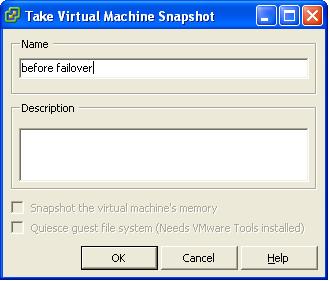
2. Create a snapshot of the replica using VMware vSphere Client. This will be used to revert the replica VMDK to its original state after the DR test being completed.

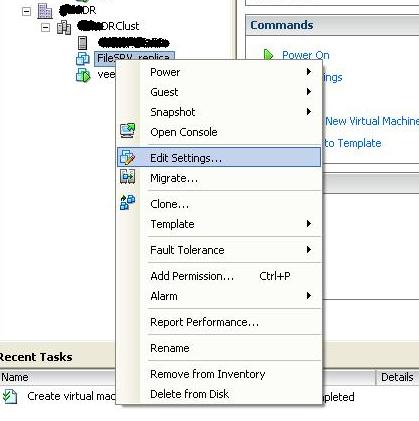
3. Change the replica VM network Configuration from being connected to production port group to an isolated test network.

4. Power on the replica Virtual Machine & test if it work properly.
5. Shutdown the replica Virtual Machine.
6. Revert back the replica virtual machine to the snapshot you have took at step 2.


7. After the virtual machine has been completly reverted back. Delete the snapshot you have created in step 2.

8. Enable the Veeam Replication job, by removing the check mark next to the disable as per the below image.

9. optional – consider starting the replication job to ensure it is working again

I hope the above help you test your Disaster Recovery regularly. A non tested Disaster Recovery has a big chance being a non working Disaster Recovery. Good Luck.
21 responses to “Testing Veeam Backup & Replication Replica Testing Procedure”
Hi Eiad,
Great article and I agree, Veeam Backup and Replication for cost effective DR which does not require like for like array based solutions is very attractive. Especially with new near CDP capabilities… Just a quick comment if I may.. How come you do not use the built in failover option? This does the snapshot for you, resets the permissions, and if you kick off a PowerShell script it can change the network settings, power up VM’s in specific orders, etc all automatically..?
Just interested is all? Keep up the good work 😀
Thanks,
Warren
Hi Warren,
If I have a disaster case, I would definitely use or ask my customer to use the great fail-over button. Though if I am only testing my customer DR pushing the failover button can be dangerous. The reason behind that, it seems each time I use the failover button then go to the DR site & test the replicated machines they will come up. Though if after that I shutdown the virtual machines at DR & let Veeam replicate again the next time you will run the replicas or failover to them in DR I will get the lovely windows blue screen. I believe this happen as the VMDK file on the DR site change without Veeam being alerted.
I have obtained actually this DR testing procedure from a Veeam engineer few months back to fix the problem I indicated above. If you have any PowerShell script that can resolve the above issue & get me to only use the failover button, I will be more than happy to test it and document on my blog if you share them with me.
Thanks,
Eiad.
Hi Eiad,
Thanks for the response.. 😀
I guess you are refering to the actual failover, and not testing?
If not, when I am testing I click the failover button, test, then use the undo failover button which then resets the permissions on the VM for me so I can continue with replication, and I do this at least once a day, and I have not seen the issue you are referring to?
Are you powering off the replicated VM manually at the DR site? Or do you use the undo failover button from the Backup/Replication GUI?
I am happy to help troubleshoot this with you…
The PowerShell script I was referring to looks something like this and is used for isolating the VM in a bubble network to avoid MAC conflicts and such…
Connect-VIServer “vCenter” get-vm | get-networkadapter | where-object { $_.networkname -like “VM Network” } | set-networkadapter -networkname “DR-Test” -Confirm:$false
Get-VM “Replicated VM” | Stop-VM | Start-VM
I have a small whitepaper on the topic, but I need to update it to the current version of Backup&Replication as its for version 3 but the ideas and methods are the same…
If you are actually comitting to a failover state I would simply power on the VM from the VI client as my prod site would be no longer and I would not have to worry about continuing replication, unless of course I wanted to failback..
Interested to see how you get on 😀
Cheers,
W
Hi Warren,
Don’t I love the Virtualization Community. Everyday I learn how to do things better from my readers 🙂 .
Actually I was covering the replica testing, which is a DR testing not the actual failover in this article.
I have noted you said you usually just power on the virtual machines in DR in case a disaster happen, I usually just use the Veeam backup & replicaiton to bring it up in that case. As in many instance being able to go back to an older version get to be very handy. I usually implement the Veeam backup & replication Virtual machine in the DR site when ever possible.
In regards, of your procedure to do the DR testing I was kinda impressed of how you do it. I did not think of scripting it using power shell, as most of my customers will consider the product complex as soon they see the first command prompt. I have one question about your procedure though, how do u stop the VM from powering up when you fail it over. As far I noted, when you failover the VMs in Veeam they will get automatically powered on. I don’t remember if there was an option to disable that. I will appreciate it if you update the white paper on the topic & send it to me, where I can share it with my readers as well. You can even share with me the old one, as I would love to test your procedure out.
Thanks for the great contribution,
Eiad
I came across the same issue, that I wanted to be able to test the failover ability, but also make sure everything was working, so I created a PowerShell script which does it for you, with the ability to bring it up on a different network or disconnected from the network altogether. Hope its useful for someone else.
http://tinyurl.com/yc26f3x
Hi Dan,
Thanks for sharing this amazing script with us, I will check it out soon.
Enjoy,
Eiad
i have a question about Veeam replication …
In case i am doing a replication to a DR site …
Is that replication incremental ???
and what about the time veeam will take the first replication ?? Do this time still the same for the second and third replication??
Hi Jozeh,
Actually Veem replication is very good at incremental replication. They only replicate the changes in the VMs after the initial full replication. Normally the initial replication is the longest replication, then each replication after that depend on the amount of changes in your data which is a minor amount in most cases.
Enjoy,
Eiad
We have an isolated DR site in terms of network connection. We replicate daily using Veeam. We are going to do a DR failover Test during which time I cannot shutdown my prod systems. I was going to disable the replication jobs, then since the DR site is cut off from our prod network i thought we could just start the guest and do our DR testing.
I take it after researching, that when I turn replication on again it will fail since the guest on DR side may have been modified?
Do i need to snap the DR guest then test as per your document or should i use the built in failover option???
Thanks
HI Debbie,
I have always used the steps I have documented in here which has worked for me 100% of the time at my customers. Though please note I have not tried the latest version of Veeam, where the failback functionality might have been improved. You might want to test the normal failback functionality in Veeam, if that did not do it after you re-initiate the replication and fail-over again. Then start all over again & always follow the instruction I have documented.
Good Luck,
Eiad
Hi Eiad,
Thank you so much, it’s a grat article. Now I also understand why I had bleu screen.
Could you please explain me (sorry I’m novice with Vmware and Veeam) how to create an isolated test network.
I have Vcenter server 4.1 with 3 hosts (ESXI 4.1 advance edition).
Thank you so much,
William
Hi William,
To great isolated network, you can create a virtual switch without any uplinks where all the VMs in this isolated network connect to this vSwitch.
I hope this help,
Eiad
Hi Eiad,
Thanks for the great step by step! As a newbie that followed this I missed the revert to current version the first time through. You may want to change the screenshot just below item number 6 that shows snapshot manager highlighted rather than revert to current snapshot. Other folks like myself may think deleting the snapshot will revert the disks instead of merging them like it does. Of course then after the next replication the disks are corrupt! Thanks again for your help!
Scott
Hi Scott,
Thanks for your valuable feedback, though what I meant in the pictures is that to use the snapshot manager and hit the goto button after choosing the snapshot that you initially took.
The only reason I did it this way, as you can do both the reverting and the deletion from the same screen. Though I will leave your comment here so others can benefit of it.
Regards,
Eiad
I know this is an old post, but is there a way to disable the job via powershell?
Thanks,
RW
Hi,
Great information here, love the veeam product :)although i’m a bit confused around the failover option you discuss, in the veeam manual it states to power off the original vm prior to doing a failover and actually points to this site to test the process if you want to.. so in warrens comment above how are you doing a failover daily and keeping the source vm’s and working user base unaffected?
Re the revert option i think its important to explain that deleting a snapshot is NOT reverting, this is in fact taking your CURRENT changes and discarding the snapshot.. so when you replicate you will have a newer VM at the DR end..so make sure you 1. REVERT and 2. Delete the snapshot.
Can anyone tell me with Replication- is there any way to maintain the MAC address of the _replica system?
Hi,
i have a questions for you:
Veeam can it works with saperated VMWare infrastructure. In my case, i have a SITE A where there is the primary infrastructure, and SITE B with the DR infrastructure. These two infrastrucuture are not in the same VMWare farm. Is it possible to implement a VM replication in this scenario?
thanks a lot
a.
Hi Alberto,
Yes, Veeam can work across different VMware infrastructures without any problems as its doing a host replication and not related to which datacenter or cluster the host you are replicating to is located.
I hope this help.
Regards,
Eiad
[…] we should be booting the replica's in Veeam in order to test them and I have also read an article Testing Veeam Backup about taking a snapshot before the test to restore the replica from. So can any of you guys tell […]
Hi,
i really appreciate what you have shared..its great.
i want to do some more harsh testing…like a real DR simulation.
in your case the replication is cleanly stopped and no replication was in progress.
I want to simulate a scenario where the replication is in progress and i completely isolate the DR ESXi from PROD ESXi by stopping the router which connects the 2 networks.
At the DR ESXi, in the Snapshot MAnager, there will be an inconsistent “Veeam Working Snapshot”. Am very interested in doing a test like this but i dont know what are the proper procedures.
please email me or reply on my comment to give the solution. thanks